提升文本生成质量的方法论
- 模型输入 / 输出
- 记忆机制
- 智能体系统
- 链式架构
LangChain 作为全功能 LLM 应用框架,其模块化组件可通过链式架构构建复杂的 LLM 系统
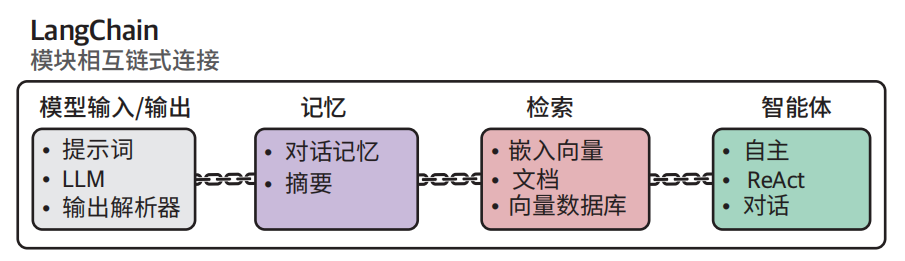
模型输入/输出
基于LangChain加载量化模型
量化技术
量化技术通过减少表示 LLM 参数所需的位数,尽可能保留原始信息完整性的前提下实现模型压缩,程会带来轻微精度损失,但能显著提升运算速度、降低显存占用,且模型准确性与原始版本基本持平。
用 32 位浮点数与 16 位浮点数表示圆周率的对比示例。注意当存储位数减半时数值精度显著降低
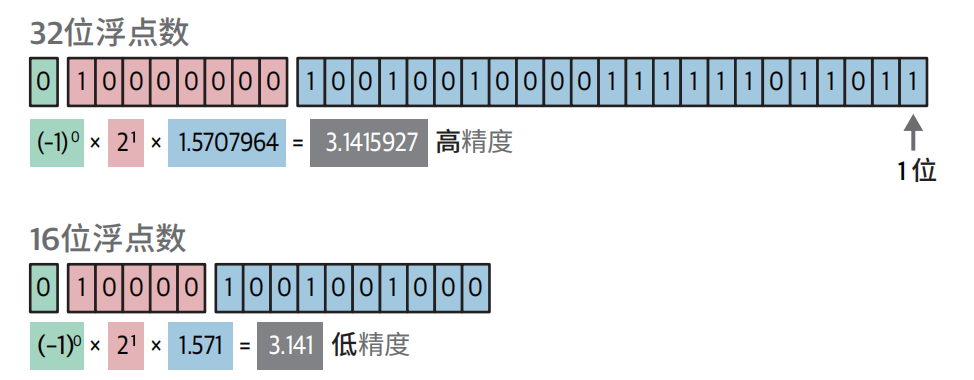
量化技术旨在准确和效率之间取得平衡。比如计算圆的周长,我们常使用∏ = 3.14来计算,当然也可以使用∏ = 3.1415926... 来计算,精度越高计算越准,但是计算效率越低。
注意:
通常建议选择至少 4 位量化的模型,此类方案能够在压缩效率与准确率之间达到最佳平衡。尽管存在 3 位甚至 2 位的量化模型,但其性能损失较为明显,这种情况下更推荐选用高精度的更小的模型。
链:扩展LLM的能力
LangChain 的名称源自其核心方法之一——链(chain)。通过整合多个独立链可以用来构建复杂系统。
链式架构的关键节点:提示词模板
from langchain import PromptTemplate
# 创建一个包含input_prompt变量的提示词模板
template = """<s><|user|>
{input_prompt}<|end|>
<|assistant|>"""
prompt = PromptTemplate(
 template=template,
 input_variables=["input_prompt"]
)

basic_chain = prompt | llm

# 使用链式架构
basic_chain.invoke(
 {
 "input_prompt": "Hi! My name is Maarten. What is 1 + 1?",
 }
)


# 响应
The answer to 1 + 1 is 2. It's a basic arithmetic operation where you add one
unit to another, resulting in two units altogether.
多提示词链式架构
我们可以将复杂的提示词拆解为若干可按顺序执行的子任务。这种方法虽然需要多次调用 LLM,但通过使用更简单的提示词,结合中间输出,能够有效降低系统复杂度
序列链式架构中,前序提示词的输出将作为后续提示词的输入
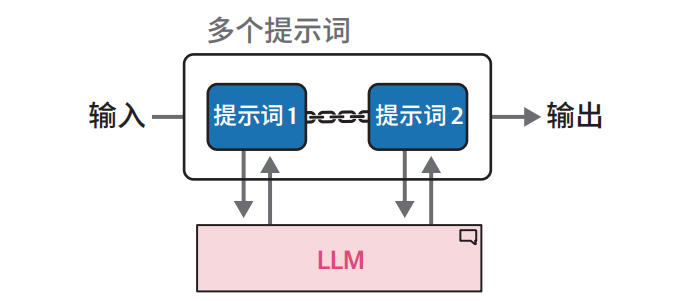
例如:假设我们需要生成包含三个要素的故事:
• 标题
• 主要角色描述
• 故事梗概
我们采用链式架构设计,用户仅需提供初始输入,系统即可按顺序生成所有要素。该流程如下图。
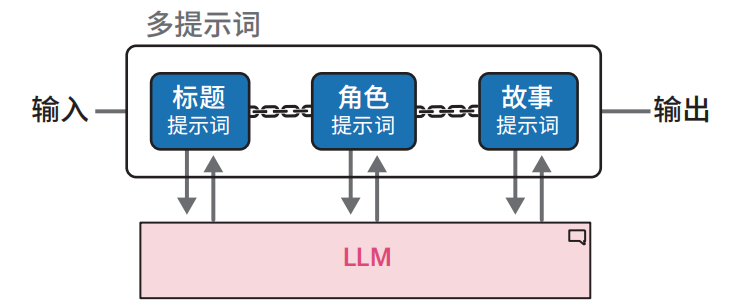
from langchain import LLMChain
# 创建一个链式架构来生成故事的标题
template = """<s><|user|>
Create a title for a story about {summary}. Only return the title.<|end|>
<|assistant|>"""
title_prompt = PromptTemplate(template=template, input_variables=["summary"])
title = LLMChain(llm=llm, prompt=title_prompt, output_key="title")

title.invoke({"summary": "a girl that lost her mother"})

# 使用故事梗概和标题创建一个链式架构来生成角色描述
template = """<s><|user|>
Describe the main character of a story about {summary} with the title {title}.
Use only two sentences.<|end|>
<|assistant|>"""
character_prompt = PromptTemplate(
 template=template, input_variables=["summary", "title"]
)
character = LLMChain(llm=llm, prompt=character_prompt, output_key="character")

# 使用故事梗概、标题和角色描述创建一个链式架构来生成故事
template = """<s><|user|>
Create a story about {summary} with the title {title}. The main character is:
{character}. Only return the story and it cannot be longer than one paragraph.
<|end|>
<|assistant|>"""
story_prompt = PromptTemplate(
 template=template, input_variables=["summary", "title", "character"]
)
story = LLMChain(llm=llm, prompt=story_prompt, output_key="story")

# 将三个组件组合在一起,创建完整的链式架构
llm_chain = title | character | story
记忆机制
由于大模型语言都是无状态设计,所以它们不会主动记忆任何先前的对话内容。那如何让模型具有记忆力?
我们可以通过如下两种方式
- 对话缓冲区
- 对话摘要
临时记忆:对话缓冲区
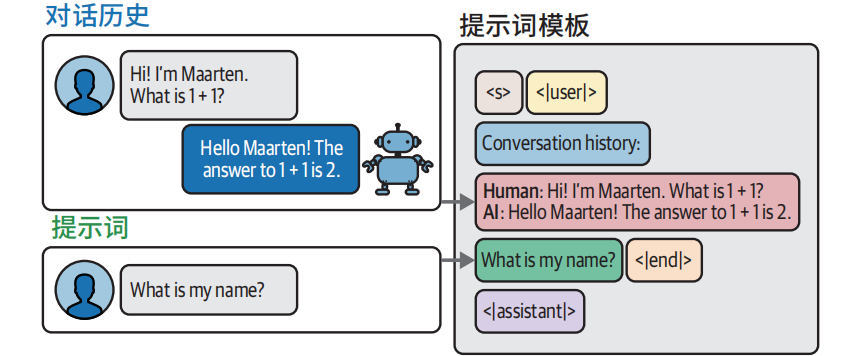
通过历史对话内容唤醒其“回忆”
# 创建一个包含聊天历史的新的提示词模板
template = """<s><|user|>Current conversation:{chat_history}
{input_prompt}<|end|>
<|assistant|>"""
prompt = PromptTemplate(
 template=template,
 input_variables=["input_prompt", "chat_history"]
)

from langchain.memory import ConversationBufferMemory
# 定义要使用的记忆类型
memory = ConversationBufferMemory(memory_key="chat_history")
# 将LLM、提示词和记忆串联在一起
llm_chain = LLMChain(
 prompt=prompt,
 llm=llm,
 memory=memory
)

# 生成对话并问一个简单问题
llm_chain.invoke({"input_prompt": "Hi! My name is Maarten. What is 1 + 1?"})
llm_chain.invoke({"input_prompt": "What is my name?"})
注意:然而随着对话轮次增加,输入提示词的文本长度会持续增长,最终可能超出模型的词元限制
解决办法就是仅保留最近 k 轮 对 话 记 录
from langchain.memory import ConversationBufferWindowMemory
# 仅在记忆中保留最后两轮对话
memory = ConversationBufferWindowMemory(k=2, memory_key="chat_history")
# 将LLM、提示词和记忆串联在一起
llm_chain = LLMChain(
 prompt=prompt,
 llm=llm,
 memory=memory
)
长久记忆:对话摘要
**对话摘要:**会对完整对话记录进行摘要提炼,保留核心信息。
这意味着每次向主 LLM 发起查询时,系统会执行两次模型调用:
• 用户提示词处理
• 摘要提示词生成
# 创建摘要提示词模板
summary_prompt_template = """<s><|user|>Summarize the conversations and update
with the new lines.
Current summary:
{summary}
new lines of conversation:
{new_lines}
New summary:<|end|>
<|assistant|>"""
summary_prompt = PromptTemplate(
input_variables=["new_lines", "summary"],
 template=summary_prompt_template
)

from langchain.memory import ConversationSummaryMemory
# 定义我们将使用的记忆类型
memory = ConversationSummaryMemory(
 llm=llm,
 memory_key="chat_history",
 prompt=summary_prompt
)
# 将LLM、提示词和记忆串联在一起
llm_chain = LLMChain(
 prompt=prompt,
 llm=llm,
 memory=memory
)

llm_chain.invoke({"input_prompt": "Hi! My name is Maarten. What is 1 + 1?"})
llm_chain.invoke({"input_prompt": "What is my name?"})
llm_chain.invoke({"input_prompt": "What was the first question I asked?"})

# 查看到目前为止的摘要内容
memory.load_memory_variables({})
局限:
- 原始问题信息未直接保留于聊天历史中,模型需要依赖上下文进行推测;
- 系统需要对同一 LLM 进行两次调用(分别用于响应提示词和摘要),这会增加计算时延。
需要在响应速度、记忆容量和准确率之间寻求平衡。
不同记忆类型的优缺点对比
普通对话缓冲区
本质:无状态模型的最朴素 “模拟有状态” 方案。
优点
- 最简单、最稳定
- 上下文完整、无丢失、无变形
- 模型理解最准
缺点
- 上下文长度爆炸增长
- 很快超过模型
max_seq_len(比如 4k、8k) - token 费高、推理变慢、容易报错
窗口式对话缓冲区
优点
- 简单、可控、稳定
- 长度被硬限制在 K 轮,不会爆上下文
- 速度快、开销固定
缺点
- 直接丢历史,信息永久丢失
- 早期关键信息(用户偏好、任务目标、背景)一丢就没
- 对话越长,越 “失忆”,逻辑容易断
- 只是治标,不是治本
本质:固定长度滑动窗口,暴力截断,最简单的防超限方案。
对话摘要记忆
优点
- 历史不会无限变长,长度可控
- 保留核心信息、意图、背景
- 适合长对话、多轮任务、客服、助手
缺点
- 摘要会丢失细节(精确数字、时间、人名、约束条件)
- 依赖模型能力,摘要可能跑偏、简化过度
- 多一次模型调用,更慢、更费 token
- 无法还原原始对话
本质:用 “压缩” 替代 “截断”,保留语义,但损失精度。
三者怎么选
- 短对话、任务明确、轮次少 → 普通缓冲区
- 中等对话、要稳定、不要丢最新内容 → 窗口式(最常用、最稳妥)
- 长对话、多轮、需要记住目标 / 背景 → 摘要 / 摘要 + 窗口混合
混合策略(主流)
- 最近 K 轮:保留完整原文(保证精度)
- 更早历史:做摘要(保留长期记忆)
业界现状
- ToC 聊天助手:90% 用 滑动窗口(简单、稳定、成本低)
- ToB 任务助手 / 智能体:主流 混合摘要(SummaryBuffer)
智能体(agent)
递进式推理
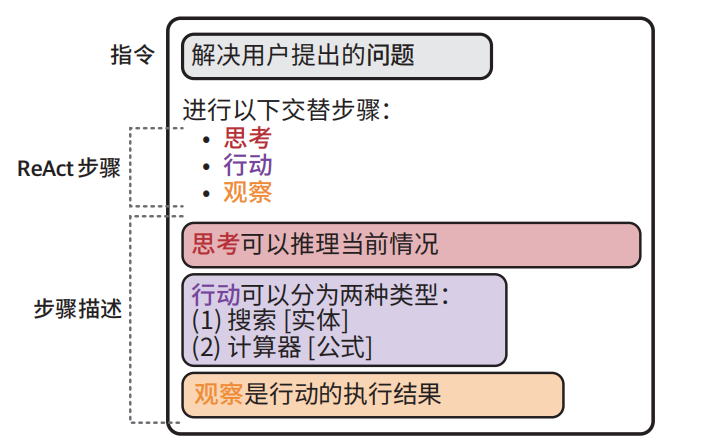
主流Agent都是基于ReAct (reasoning and acting)核心机制: 思考(thought/Reasoning) → 行动(acting) → 观察observation),循环执行。
边思考、边行动、边迭代。
ReAct 提示词模板示例
import os
from langchain_openai import

# 使用LangChain加载OpenAI的LLM
os.environ["OPENAI_API_KEY"] = "MY_KEY"
openai_llm = ChatOpenAI(model_name="gpt-3.5-turbo", temperature=0)

# 创建ReAct模板
react_template = """Answer the following questions as best you can. You have access
to the following tools:
{tools}

Use the following format:
Question: the input question you must answer
Thought: you should always think about what to do
Action: the action to take, should be one of [{tool_names}]
Action Input: the input to the action
Observation: the result of the action
... (this Thought/Action/Action Input/Observation can repeat N times)
Thought: I now know the final answer
Final Answer: the final answer to the original input question
Begin!
Question: {input}
Thought:{agent_scratchpad}"""
prompt = PromptTemplate(
template=react_template,
 input_variables=["tools", "tool_names", "input", "agent_scratchpad"]
)

from langchain.agents import load_tools, Tool
from langchain.tools import DuckDuckGoSearchResults
# 你可以创建工具传递给智能体
search = DuckDuckGoSearchResults()
search_tool = Tool(
 name="duckduck",
 description="A web search engine. Use this to as a search engine for gen
eral queries.",
 func=search.run,
)
# 准备工具
tools = load_tools(["llm-math"], llm=openai_llm)
tools.append(search_tool)


from langchain.agents import AgentExecutor, create_react_agent
# 构建ReAct智能体
agent = create_react_agent(openai_llm, tools, prompt)
agent_executor = AgentExecutor(
 agent=agent, tools=tools, verbose=True, handle_parsing_errors=True
)

# MacBook Pro的价格是多少?
agent_executor.invoke(
 {
 "input": "What is the current price of a MacBook Pro in USD? How much
would it cost in EUR if the exchange rate is 0.85 EUR for 1 USD."
 }
)